
Sensor Programming
i-Sensor® EVOThe perfect, cost-effective upgrade from the i-Sensor® Original.
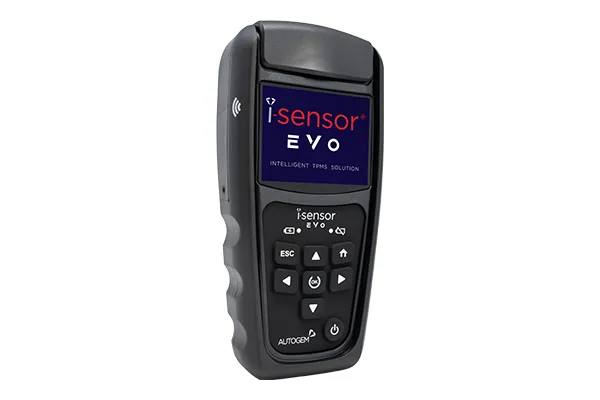
The brand new TPMS platform from Autogem, sitting firmly between the i-Sensor® Original and the i-Sensor® PRO. A robust, ergonomic design with a 3.5” full-colour TFT screen, intuitive icon-based navigation and Bluetooth OBDII as standard.
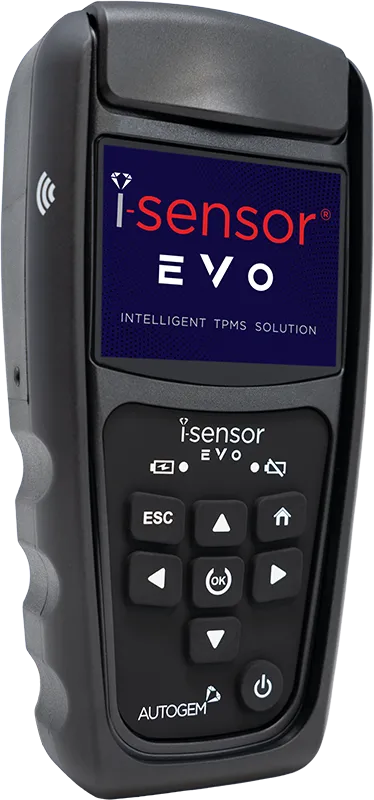
3.5” screenFull-colour TFT
WirelessSensor programming
3.5”Full-colour TFT screen
2 waysCradle & wireless programming
99%+Direct TPMS vehicle coverage
£0Lifetime Wi-Fi updates
The new TPMS platform
Programming without limits.
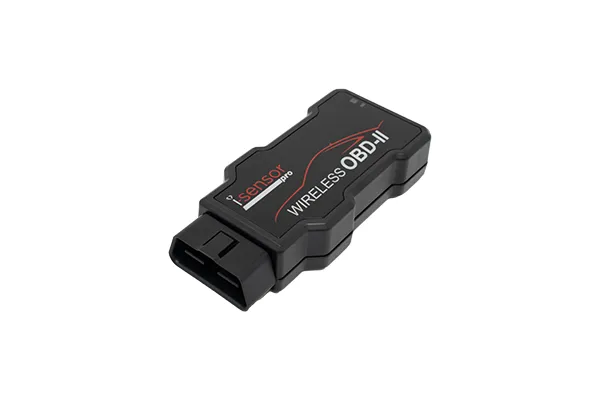
Program sensors via the built-in cradle or wirelessly – giving you ultimate flexibility when making and correcting TPMS issues. OBDII interaction comes as standard via a Bluetooth Low Energy (BLE) adapter, delivering the same ECU functionality from a cable-free platform.
- Robust, ergonomic design with a 3.5” full-colour TFT screen
- Intuitive, icon-based navigation
- Fully compatible with all i-Sensor® blank sensors
- Free lifetime Wi-Fi updates
Features
Built to make TPMS easier
Valuable features for enhanced TPMS diagnosis and maintenance – with on-board resources to support every technician.
Full-colour TFT screen
A 3.5” full-colour display with intuitive, icon-based navigation.
Cradle or wireless
Program i-Sensors via the in-built cradle or wirelessly – whichever suits the job.
Bluetooth OBDII as standard
Cable-free ECU functions via the included Bluetooth Low Energy adapter.
OE sensor photo library
Identify OE sensors and look up OE numbers with a detailed image library.
Relearn database
A comprehensive on-board database of vehicle relearn procedures.
ID Manual Check
A tech-support-inspired tool for advanced ID troubleshooting.
Cable-free OBDII
Bluetooth OBDII as standard
Connect the Bluetooth Low Energy adapter to the vehicle and get full ECU functionality – without a cable in sight. Plus an on-board OBD port location guide to find the port fast.
Read & write ECUView stored TPMS info and write sensor IDs.
Clear TPMS DTCsClear TPMS diagnostic trouble codes.
Unlock ECUUnlock secured ECUs to allow programming.
Disable Shipping ModeActivate locked OE sensors.
Coverage is vehicle dependent.
Reports & records
Document every job
Save, manage and edit jobs on the tool – then export them to share with your customers.
TPMS condition report
Export saved jobs to a printable TPMS condition report.
TIM software
Store saved jobs and reports on your PC with Tyre Information Manager.
Tyre & vehicle data
Record tyre brand, size and DOT code, plus licence plate, VIN, mileage and notes.
How it works
From diagnosis to done in three steps
One tool, one sensor range and a guided process – with the relearn procedure right there on screen.
1
Test the sensor
Diagnose the existing OE or aftermarket sensor and check its ID, pressure, battery and temperature.
2
Program – cradle or wireless
Create a brand new sensor or a clone of the original in seconds, in the cradle or wirelessly.
3
Relearn and finish
Follow the on-board relearn procedure, or write the new IDs to the ECU via Bluetooth OBDII.
Compare the range
Original, EVO or PRO?
See how the i-Sensor® EVO sits between the Original and the PRO. Hover over a feature for more detail.
| Features | Original+ optional OBDIIView | This toolEVOWireless & Bluetooth | PROFull tyre inspectionView |
|---|---|---|---|
| Coverage & programming | |||
| Over 99% coverage | |||
| Worldwide coverage | |||
| i-Sensor® compatible | |||
| Diagnose sensors | |||
| Clone sensors | |||
| Make new sensors | |||
| Cradle programming | |||
| Wireless programming | |||
| OBDII & ECU | |||
| Bluetooth OBDII | |||
| Cabled OBDII | Optional | ||
| Read ECU | * | ||
| Write ECU | * | ||
| Clear TPMS DTCs | * | ||
| Unlock ECU | * | ||
| Disable Shipping Mode | * | ||
| OBD port location | |||
| Knowledge & updates | |||
| Relearn procedures | |||
| Image library | |||
| ID matching | |||
| Wi-Fi updates | |||
| Updater Software | |||
| Reports & inspection | |||
| TPMS condition report | |||
| TPMS & tyre condition report | |||
| TIM software | |||
| Record tyre data | |||
| Record vehicle data | |||
| Capture tread depths | |||
| Auto focus camera | |||
| QR code reading | |||
| Support | |||
| Technical support | |||
| Training |
* With the optional OBDII upgrade for the i-Sensor® Original tool.
Already own one?
Manuals, updates & support
Keep your i-Sensor® EVO running at its best. Download the latest manual, update your tool, or get help from our UK-based TPMS team.
- Free-for-life Wi-Fi updates
- Unlimited free online training
- Expert UK-based technical support
Get in touch
Talk to our TPMS team
Questions about the i-Sensor® EVO? Call us on 0208 838 0910, option 4.

